Design Your Year: Master Custom Calendars with This InDesign Template
Staring at a generic calendar from the office supply store often feels uninspiring. For designers, entrepreneurs, and content creators, the visual presentation of time management matters just as much as the schedule itself. A Calendar InDesign Template bridges the gap between functionality and high-end design, offering a professional framework that you can fully customize. This isn't just about picking a date; it is about curating a visual experience that aligns with your personal brand or business identity.
A Professional Framework for Every Format
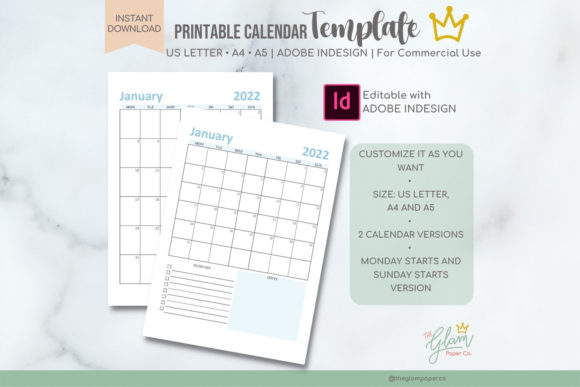
The strength of a professional planner lies in its adaptability. This specific template package is built for the modern creative, ensuring your work looks polished regardless of the medium. It includes industry-standard formats: US Letter (8.5 x 11 in), A4 (210 x 297 mm), and the more compact A5 (148 x 210 mm). By providing .Indd files for each size, the template respects the technical requirements of print production and digital distribution. Whether you are printing a desk calendar for a client or creating a downloadable PDF for your blog audience, the dimensions are already optimized.
Visually, the design balances structure with creative freedom. It avoids the clutter of pre-filled designs, offering a clean layout that acts as a canvas. The typography is set up to guide the eye naturally from the month to the specific dates, but because it is an editable template, you have the power to alter the hierarchy. You can swap serif fonts for sans serif fonts to change the mood, or introduce a script font for headers to add a touch of elegance. This flexibility allows the calendar to function as a true design asset rather than a static product.
Customization: Beyond Simple Date Changes
The most significant advantage of using Adobe InDesign for calendar creation is the level of control it grants. You are not locked into a specific year or aesthetic. The template allows you to create unique designs for any year by simply editing the text layers. This is particularly useful for small business owners and marketers who need to produce annual branded materials without starting from scratch every January.
Consider the practical applications for your brand identity:
- Visual Consistency: By using your brand’s specific color palette and premium fonts, you reinforce brand recognition every time a client or fan checks the date.
- Editorial Design: Bloggers and publishers can use the A4 or US Letter versions to create content planners that match their website’s aesthetic, offering them as free downloads to grow their email list.
- Packaging Design: If you sell physical goods, an A5 calendar tucked into a shipment serves as a high-value thank you gift that keeps your brand top-of-mind.
- Social Media Graphics: You can export individual months as images to use as social media graphics, maintaining a cohesive look across your digital platforms.
The ability to add images transforms the calendar from a utility into a portfolio piece. Photographers can showcase their best shots, while illustrators can display their art monthly. This turns a functional item into a piece of editorial design that engages the audience emotionally.
Technical Requirements and Commercial Use
While the template is designed for ease of use, it does require a foundational understanding of Adobe InDesign CC. This is not a simple drag-and-drop web tool; it is a professional software environment. If you are comfortable navigating layers, editing text frames, and managing color swatches, you will find the workflow seamless. The package includes two versions for each size: a "Calendar" version with more design elements and a "Calendar Simple" version for a minimalist approach. This distinction allows you to choose the complexity that fits the project.
One of the most valuable aspects of this package is the licensing. It is cleared for both personal and commercial use. This means you can sell the calendars you create. For crafters and entrepreneurs on platforms like Etsy or Shopify, this is a low-overhead way to generate digital products. You can create a calendar once, update the dates for the following year, and sell it repeatedly.
Evaluating Your Project Fit
When deciding if this InDesign template is right for your project, consider the end-user experience. If you are creating a digital download, ensure your audience has access to a PDF reader. If you are printing, the inclusion of bleed marks and proper margins in the template ensures a professional finish.
Think about the visual hierarchy of your design. The template provides a baseline, but you should evaluate if the default spacing works for your content. If you plan to use a heavy display font, you may need to adjust the tracking to ensure the dates remain legible. Readability is paramount in a calendar; if a user cannot quickly identify the 15th, the design has failed its primary function.
Ultimately, this Calendar InDesign Template is a tool for efficiency and professionalism. It eliminates the technical hurdles of setting up grids and master pages, allowing you to focus on the creative aspects—choosing the perfect images, selecting a font pairing that resonates with your brand, and designing a year that your audience will love to display. It is a practical solution for anyone looking to produce high-quality print